
The Screen Printer’s Process: What Helps and What Makes It Difficult
Screen printing is a meticulous technique that involves creating stencils and transferring designs onto various substrates, such as apparel, through a mesh screen. This comprehensive guide delves into the step-by-step process, essential tools, and challenges faced by screen printers to achieve high-quality, durable prints.

Best practices for screen printers
Screen printing is an art, a science, and, sometimes, a test of patience. For those who work in the industry, every job is a mix of skill, preparation, and adaptability. Whether printing custom t-shirts for a local business, designing high-quality apparel for a clothing brand, or cranking out bulk orders for an event, the process is as rewarding as it is demanding.
Let’s dive into what goes into the process of screen printing, what makes the job easier, and the challenges that can turn a routine job into a frustrating one.
The Screen Printing Process: Step by Step
Screen printing is a meticulous process that requires precision, attention to detail, and the right equipment. From preparing the artwork to curing the ink and inspecting the final product, each step plays a crucial role in achieving high-quality prints. Below is a detailed breakdown of the screen printing process and how each stage contributes to a successful print.
1. Preparing the Artwork
The first step in screen printing is creating or receiving artwork that is "print-ready." High-quality artwork is essential because a low-resolution or improperly formatted design can result in blurry, pixelated prints. The standard resolution for screen printing is 300 DPI (dots per inch), ensuring sharp, clean lines.
Choosing the Right File Format
To make the process efficient, printers prefer vector files such as AI (Adobe Illustrator), EPS, or SVG. Vector files are scalable without losing quality, making them ideal for screen printing. Raster images (such as PNG or JPEG) are less ideal unless they are high resolution and properly sized.
Color Separation
Once the artwork is finalized, it must be separated into individual colors. Since screen printing applies one color per screen, each color in the design will require its own screen. For instance, a four-color design needs four separate screens. This process, known as color separation, ensures that each layer aligns correctly when printed.
Converting to Halftones (If Necessary)
If the design has gradients or shading, printers use a technique called halftoning. This converts the image into tiny dots of varying sizes, allowing the illusion of shading when printed in a single color.
By thoroughly preparing the artwork, screen printers reduce production errors and ensure an efficient workflow.
2. Creating the Screens
The screens used in screen printing are at the core of the entire process. These screens act as stencils, allowing ink to pass through specific areas of the design while blocking out the rest.
Coating the Screens
Each screen is made from a fine mesh stretched over a frame (typically aluminum or wood). To prepare the screens, they must be coated with a light-sensitive emulsion. This emulsion is evenly applied across the screen and then left to dry in a dark room. If the emulsion is applied unevenly, the ink may not transfer correctly, causing inconsistencies in the final print.
Exposing the Screens
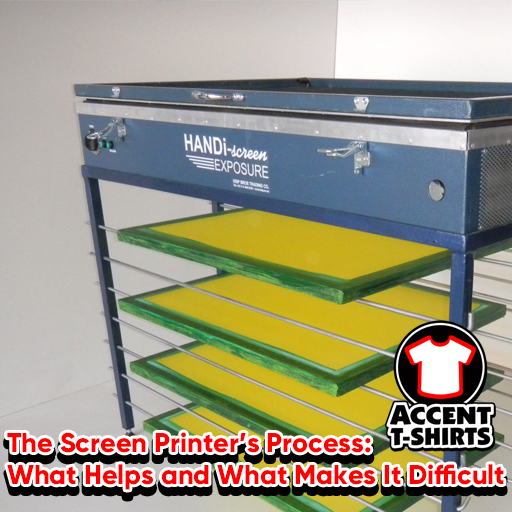
After the emulsion dries, a film positive of the artwork is placed onto the screen, and it is exposed to UV light. The areas of the screen exposed to UV light harden, while the areas covered by the design remain soft and washable.
Washing Out the Design
Once the exposure is complete, the screen is rinsed with water to wash away the unexposed emulsion, leaving behind a stencil of the design. At this stage, the screen is inspected for any imperfections, such as incomplete exposure or pinholes. If the screen is not properly prepared, it can cause misprints, ink bleeds, or require a complete redo.
A properly prepared screen results in crisp, clean edges and ensures that ink is applied evenly during printing.
3. Setting Up the Printing Press
Once the screens are ready, they are mounted onto the printing press. There are two types of printing presses:
- Manual presses – The printer pulls the squeegee by hand, controlling the ink application.
- Automatic presses – The machine applies the ink, making it ideal for high-volume orders and consistent results.
Aligning the Screens (Registration)
For multi-color designs, it is crucial that all screens align perfectly. This step, known as registration, ensures that each layer of color prints in the correct position. Even a slight misalignment can cause colors to overlap incorrectly or appear off-center.
Preparing the Platens
The platen is the flat surface that holds the garment in place during printing. Before printing begins, the platen is coated with a light adhesive to keep the fabric from shifting during ink application.
Test Prints
Before starting the full run, a test print is done on scrap fabric to check for:
- Proper ink coverage
- Screen alignment
- Any issues with registration
If adjustments are needed, they are made before moving forward with production.
4. Printing the Design
With the setup complete, the actual printing process begins.
Step-by-Step Printing Process
Placing the Garment on the Platen
The garment is positioned correctly on the platen, ensuring the design prints in the right location.Applying Ink to the Screen
The correct ink color is placed on top of the screen. Screen printers use different inks, such as plastisol ink (most common), water-based ink (for softer prints), or discharge ink (for vintage-style designs).Using the Squeegee to Apply Ink
The squeegee is pulled across the screen, forcing ink through the mesh and onto the fabric. This must be done with consistent pressure and angle to ensure even ink distribution.Repeating for Each Color
If the design has multiple colors, the process is repeated with each screen and ink layer. Proper registration is checked to ensure alignment remains accurate.
For high-volume orders, automatic presses can print hundreds of shirts per hour, making the process significantly faster.
5. Curing the Ink
Once the design is printed, the ink must be cured to ensure it properly bonds with the fabric.
The Curing Process
- The printed garments are placed onto a conveyor dryer, which heats the ink to around 320°F (for plastisol ink). This ensures durability and prevents cracking or peeling.
- For water-based and discharge inks, additional curing time or a heat press may be required.
Why Proper Curing Matters
If the ink is not fully cured, it can wash out, crack, or fade prematurely. Testing a small sample by stretching the print or washing a test shirt helps confirm that the curing process was successful.
6. Quality Control and Finishing
Once the garments are printed and cured, they go through final inspection to ensure quality.
Checking for Common Issues
Each garment is checked for:
- Ink smudges
- Misalignment
- Uneven curing
- Color accuracy
Shirts that do not meet quality standards are removed, and any issues are addressed before the order is completed.
Finishing Touches
After passing quality control, the garments are:
- Folded neatly
- Packed according to the customer’s request
- Prepared for shipment or pick-up
Final Thoughts
Screen printing is a multi-step process that requires skill, patience, and precision. From preparing artwork and screens to printing and curing the ink, each step plays a vital role in producing high-quality prints.
By following proper techniques and using high-quality materials, screen printers can ensure consistent results, customer satisfaction, and long-lasting prints. Whether you’re printing a small batch of custom shirts or handling a large-scale order, understanding the screen printing process helps make every job successful.
What Helps a Screen Printer?
Screen printing is an intricate craft that requires skill, precision, and the right tools to produce high-quality prints. While the job can present challenges, several factors can make the process more efficient, smoother, and less stressful.
From high-quality artwork to proper shop organization, each element plays a critical role in ensuring successful production. Below is a deep dive into what helps a screen printer create clean, consistent, and professional prints.
1. High-Quality Artwork
The foundation of any great print is the artwork. When customers provide low-resolution, blurry, or improperly formatted files, it slows down the entire process and can lead to poor print quality.
Why High-Quality Artwork Matters:
- Crisp Lines & Details: High-resolution images ensure that fine details are preserved when transferred onto screens.
- Smooth Color Separations: Properly formatted files allow for easier color separation, avoiding errors during the printing process.
- Minimized Pre-Production Adjustments: Printers don’t have to spend excessive time cleaning up or converting images before printing.
Best Artwork Formats for Screen Printing:
- Vector Files (AI, EPS, SVG, PDF) – These files can be resized without losing quality and are preferred for screen printing.
- High-Resolution Raster Images (PNG, TIFF, PSD, JPEG at 300 DPI) – Acceptable if properly sized and formatted but not as ideal as vector files.
Tips for Customers Providing Artwork:
- Always send files in CMYK or Pantone color mode instead of RGB, as this helps with accurate ink matching.
- If submitting a raster image (JPEG or PNG), ensure it's at least 300 DPI at the print size.
- Avoid low-quality screenshots or compressed images, as they can appear pixelated on the final product.
When customers provide clean, properly formatted artwork, printers can jump into the production process faster and ensure a crisp, professional finish.
2. Proper Screen Preparation
The quality of the screen itself directly impacts the final print. A poorly prepared screen can cause ink to bleed, clog, or create fuzzy edges.
Steps for Proper Screen Preparation:
- Choose the Right Mesh Count: Different designs require different mesh counts (e.g., 110 mesh for bold prints, 230 mesh for fine details).
- Evenly Coat the Screen with Emulsion: A smooth, consistent layer ensures proper exposure. Uneven coatings can cause streaks or weak spots.
- Expose the Screen Correctly: Underexposing or overexposing the screen can cause details to be lost or the emulsion to wash out improperly.
- Thoroughly Rinse and Dry Screens: After exposing, washing out the stencil evenly prevents ink from seeping into unwanted areas.
Common Screen Preparation Mistakes:
- Overexposed Screens: The design won’t properly wash out, making it difficult to transfer ink.
- Underexposed Screens: The emulsion might break down too easily, causing premature stencil breakdown during printing.
- Dust or Lint on the Screen: Small particles can create unwanted pinholes in the design, leading to ink bleeding.
A well-prepared screen ensures clean, sharp prints and reduces wasted materials.
3. Efficient Equipment
Using the right equipment can make a massive difference in speed, efficiency, and quality. Screen printing can be done using manual presses or automatic presses, and having well-maintained machines helps produce consistent results.
Essential Screen Printing Equipment:
- Manual or Automatic Printing Press: Automatics are ideal for large production runs, while manual presses work well for small batches or custom prints.
- Reliable Exposure Unit: Ensures screens are correctly exposed for clear, defined stencils.
- Quality Squeegees & Flood Bars: The right squeegee pressure and angle impact ink coverage and clarity.
- Proper Drying Equipment (Flash Dryer or Conveyor Dryer): Ensures ink cures at the right temperature to prevent cracking or fading.
Why Equipment Maintenance is Important:
- Old or Damaged Squeegees: Worn-out squeegees create uneven ink distribution, leading to blotchy prints.
- Poorly Maintained Screens: Ink buildup on screens can cause clogging, reducing print clarity.
- Dryer Malfunctions: If ink isn’t properly cured, designs may wash out after just one use.
Regular cleaning and equipment checks prevent costly delays and ensure prints remain consistent over time.
4. Organized Workspaces
A cluttered shop can slow down production, cause misprints, and lead to misplaced materials. Keeping everything well-organized and within reach helps maximize efficiency.
Key Aspects of an Organized Print Shop:
- Designated Areas for Screens, Inks, and Tools: Everything should have its own place to prevent mix-ups and wasted time.
- Proper Ventilation: Many screen printing inks contain chemicals that require adequate airflow for safety.
- Easy-to-Clean Surfaces: Ink spills happen—having wipeable workstations speeds up cleanup.
- Well-Labeled Ink Storage: Clearly labeling inks prevents accidental color mismatches and reduces wasted product.
A clean and structured shop makes printing smoother and reduces the chances of mistakes.
5. Consistent Inks and Materials
The quality of ink and materials directly affects print durability, vibrancy, and ease of use. Using cheap or inconsistent inks can lead to poor adhesion, uneven prints, or premature fading.
Why Quality Inks Matter:
- Better Opacity & Coverage: Cheap inks often require multiple passes, wasting time and materials.
- Consistent Flow & Drying Time: Poor-quality inks can dry too quickly, clogging screens, or too slowly, leading to smudging.
- Longevity & Durability: High-quality inks ensure prints stay vibrant even after multiple washes.
Types of Inks Used in Screen Printing:
- Plastisol Ink: Thick and durable, perfect for bold, vibrant prints.
- Water-Based Ink: Softer feel, ideal for vintage or eco-friendly designs.
- Discharge Ink: Removes dye from the fabric for a soft, natural look.
Using high-quality ink and materials results in smoother application and more professional prints.
6. Good Customer Communication
Clear and open communication with customers is essential to avoid misunderstandings, costly reprints, and delays.
How Customers Can Help the Printing Process:
- Provide Clear Design Guidelines: Specify ink colors, placement, and fabric type to prevent unexpected issues.
- Understand Print Limitations: Some designs may need modifications to work with screen printing (e.g., gradients or very fine details).
- Confirm Order Details Before Production: Double-check sizing, colors, and placement before the print run starts.
Common Customer Misunderstandings & Solutions:
- Color Expectations: Educate customers on Pantone matching vs. RGB/CMYK differences.
- Print Size Issues: Provide a print preview so they understand how the design will appear on different shirt sizes.
- Fabric Limitations: Some materials (like polyester) may require special inks to prevent dye migration.
By setting clear expectations, both printers and customers can avoid unnecessary headaches and ensure a smooth, successful project.
Key Takeaways
Screen printing is a detailed and multi-step process that can be made much easier with proper preparation, organization, and quality materials. By following best practices, maintaining equipment, and communicating effectively with customers, screen printers can produce high-quality results with minimal stress.
When all these factors align, screen printing becomes a rewarding, efficient, and successful craft!
What Makes Screen Printing Difficult?
Screen printing is a rewarding yet challenging craft that requires precision, patience, and problem-solving skills. Despite careful planning, unpredictable factors can make the process more difficult than expected. From technical mishaps to last-minute customer changes, screen printers often face hurdles that slow down production and increase costs.
Below, we explore six major challenges that screen printers encounter, breaking down why these issues occur and how they can be mitigated.
1. Misaligned Screens
Proper screen registration is critical in screen printing, especially for multi-color designs. If the screens are not perfectly aligned, the different colors in the print won't match up correctly, leading to blurry, distorted, or offset prints. Fixing misalignment can be frustrating and time-consuming, as it requires re-registering screens and printing multiple test samples before proceeding with the full order.
Common Causes of Misalignment:
- Poor Screen Registration: If screens are not locked in place correctly, they can shift slightly, throwing off the alignment.
- Ink Build-Up on Screens: As printing progresses, excess ink can accumulate around the edges of the stencil, causing distortions.
- Stretching or Warping of Screens: Over time, screens may loosen or warp, affecting accuracy.
How to Prevent Misalignment:
- Use Micro-Registration on the Printing Press: This allows for precise adjustments without having to remove the screens.
- Double-Check Test Prints: Running multiple test prints ensures that colors align properly before committing to the full production.
- Maintain Proper Screen Tension: A well-tensioned screen remains stable throughout printing.
When screens are perfectly aligned, multi-color designs look sharp, professional, and consistent.
2. Ink Drying Too Fast or Too Slow
Ink consistency is one of the biggest variables in screen printing. Some inks dry too fast, clogging the screen and making it difficult to complete a print run. Others take too long to cure, requiring additional time in the dryer.
Challenges with Fast-Drying Ink:
- Ink may dry in the screen’s mesh, blocking it and making it difficult to continue printing.
- Printers may have to stop frequently to clean screens, slowing down production.
- Rapid-drying inks can cause uneven prints, as they don’t flow smoothly through the screen.
Challenges with Slow-Drying Ink:
- If the ink doesn’t cure properly, it may crack, fade, or wash out after a few washes.
- Ink that stays wet for too long can smudge or transfer onto other garments.
- Extra drying time increases production costs and limits how quickly orders can be completed.
Factors That Affect Ink Drying Speed:
- Humidity & Temperature: High humidity slows ink drying, while dry conditions can cause ink to harden too quickly.
- Type of Ink: Water-based inks dry faster than plastisol inks, which require proper heat curing.
- Airflow in the Shop: Poor ventilation can lead to inconsistent drying times.
Solutions:
- Use a Retarder: Slows down drying time for fast-drying inks.
- Adjust Flash Dryer Temperature: Ensures ink is fully cured without overexposing garments.
- Store Inks Properly: Keeping ink at optimal temperatures prevents unexpected drying issues.
Finding the right balance between ink drying speed and curing time is key to achieving durable, high-quality prints.
3. Fabric Variations
Not all fabrics behave the same way during screen printing. Different textiles absorb, resist, or react to ink in unique ways, making it challenging to achieve consistent results.
How Different Fabrics Affect Printing:
- Cotton: Absorbs ink well, making it the easiest material to print on.
- Polyester: Can cause dye migration, where the fabric color bleeds into the print.
- Tri-Blends (Cotton/Polyester/Rayon): Often require special inks to prevent ink bleeding or fading.
- Nylon & Synthetic Fabrics: May need special adhesives or additives to ensure ink adhesion.
Dye Migration Explained:
Dye migration happens when heat from the curing process causes the dye in polyester fabrics to release and blend into the ink, turning a white design pink on a red shirt, for example.
How to Overcome Fabric Challenges:
- Use low-cure inks designed to prevent dye migration on polyester.
- Test ink adhesion on unfamiliar fabrics before printing a full run.
- Use a bleed-resistant underbase when printing on dark or synthetic materials.
Understanding fabric behavior before production saves time, money, and frustration.
4. Unexpected Customer Changes
One of the most frustrating aspects of screen printing is when customers request last-minute changes after production has already started.
Common Customer Change Requests:
- Switching Ink Colors: Requires re-mixing inks and sometimes re-burning screens.
- Changing Garment Type: Affects how ink adheres and may require a different printing approach.
- Modifying the Design: May require completely redoing screens and artwork.
- Adjusting Print Placement or Size: Even minor changes can lead to wasted materials and extra labor.
Why Last-Minute Changes Cause Problems:
- Screen Setup is Permanent: Once screens are burned, they can’t be altered easily.
- Extra Costs: Re-doing work increases labor, material, and ink expenses.
- Delays in Production: Changes disrupt workflow and push back completion dates.
How to Minimize Last-Minute Changes:
- Require Customer Approval Before Printing: A digital proof or printed sample ensures that the design meets expectations.
- Charge Fees for Post-Approval Changes: Helps deter unnecessary modifications.
- Communicate Clear Deadlines: Let customers know when final decisions must be made to keep production on schedule.
Setting clear policies prevents miscommunication and protects the printer’s time and resources.
5. Cleaning and Maintenance
After a long print run, cleaning up is often the most tedious part of the job. However, neglecting maintenance can cause serious issues for future prints.
Why Cleaning Screens is Crucial:
- Ink Build-Up: If screens aren’t cleaned properly, dried ink clogs the mesh and ruins future prints.
- Stencil Degradation: Leftover ink can break down emulsion, affecting the next design.
- Reduced Screen Lifespan: Proper maintenance extends screen usability and prevents costly replacements.
Essential Cleaning Tasks:
- Remove Ink Immediately After Use: Prevents ink from drying in the screen.
- Use the Right Cleaning Solvents: Ensures screens are completely ink-free without damaging the mesh.
- Degrease Screens Before Re-Coating: Removes oils and debris that could interfere with future stencils.
While it may be time-consuming, regular maintenance ensures a smooth, efficient printing process.
6. Rush Orders
Some customers need shirts "yesterday," which can mean late nights and extra pressure for the printer. While some jobs can be expedited, screen printing requires time for setup, printing, curing, and quality control.
Why Rush Orders are Challenging:
- No Room for Mistakes: Limited time means less flexibility to fix errors.
- Increased Stress: Printers have to work faster, increasing the risk of misprints.
- Potential Ink & Drying Issues: Fast production can lead to poor ink adhesion or incomplete curing.
How to Handle Rush Orders:
- Charge a Rush Fee: Compensates for the extra labor and stress.
- Use Pre-Coated Screens: Saves time in the setup phase.
- Ensure Customers Understand Limitations: Not all designs can be rushed without compromising quality.
While rush jobs can be profitable, they require careful planning to maintain print quality.
Bottom Line
Screen printing is full of technical and logistical challenges, but knowing how to anticipate and solve problems makes the job much easier. By mastering screen alignment, ink consistency, fabric behavior, customer communication, maintenance, and rush orders, screen printers can navigate even the toughest jobs with confidence.
Final Thoughts: The Art of Screen Printing
Screen printing is much more than just pushing ink through a screen—it is a carefully crafted balance of creativity, precision, and hands-on expertise. From the first stages of design preparation to the final step of curing the ink, every detail matters in order to create a long-lasting and high-quality print.
This centuries-old method of printing has remained one of the most versatile and widely used techniques for producing custom apparel, posters, and various promotional items. Despite technological advancements, screen printing still requires a deep understanding of materials, equipment, and ink application techniques. While automation has certainly made large-scale production easier, the skill of the printer remains the most crucial factor in ensuring a professional result.
The Perfect Blend of Art and Science
At its core, screen printing is a combination of artistic creativity and technical skill. While digital printing has gained popularity, screen printing remains unmatched when it comes to bold, vibrant colors and long-lasting durability.
A well-executed screen print requires:
- Creative Vision: Understanding how designs translate from a digital format to a physical print.
- Technical Precision: Aligning screens perfectly, choosing the right ink type, and maintaining consistent pressure during printing.
- Hands-On Expertise: Unlike automated printing processes, screen printing involves manual setup, color mixing, and physical labor.
Whether printing a single design on a hoodie or fulfilling a 1,000-shirt order for a major event, each print job presents unique challenges that require problem-solving and adaptability.
Why Screen Printing is Still Relevant Today
Even though newer printing technologies like direct-to-garment (DTG) and sublimation have emerged, screen printing remains a go-to method for many businesses, clothing brands, and artists.
Advantages of Screen Printing Over Other Methods
- Bold, Vibrant Colors: Screen printing produces rich, opaque colors that stand out on both light and dark fabrics.
- Durability: Properly cured screen prints last through multiple washes without fading or cracking.
- Cost-Effectiveness for Bulk Orders: While the setup process takes time, screen printing becomes highly efficient for larger runs.
- Customizability: Specialty inks like metallic, glow-in-the-dark, puff, and glitter inks make it possible to create one-of-a-kind effects that other methods struggle to replicate.
While digital printing may be faster for one-off or small orders, screen printing continues to dominate in industries where quality, durability, and cost efficiency matter most.
Overcoming the Challenges of Screen Printing
Despite its advantages, screen printing comes with its fair share of challenges that require skill and patience to overcome.
Common Difficulties in Screen Printing:
- Maintaining Proper Registration: Aligning multiple screens for multi-color prints requires extreme accuracy.
- Ink Drying & Curing Issues: Ensuring proper ink consistency and curing temperatures prevents designs from washing out.
- Handling Fabric Variations: Different materials absorb ink in unique ways, requiring adjustments in technique.
- Keeping Equipment in Top Shape: Proper maintenance of screens, squeegees, and presses ensures smooth production.
Screen printers who develop strong troubleshooting skills and invest in the right tools can minimize frustration and increase production efficiency.
How Printers Can Improve Efficiency & Quality:
✔ Use High-Quality Screens & Emulsion: Well-prepared screens ensure crisp, detailed prints with minimal ink bleed.
✔ Maintain an Organized Workspace: Keeping tools, inks, and garments neatly arranged prevents mistakes and wasted time.
✔ Invest in a Reliable Drying System: A high-quality conveyor dryer ensures proper ink curing, reducing the risk of premature fading.
✔ Train Employees or Assistants Well: For print shops with a team, proper training ensures consistency and speeds up production.
Success in screen printing isn’t just about having the best equipment—it’s about understanding the process, staying patient, and continuously learning.
Customer Awareness: Why It Matters
While the printing process itself requires a high level of expertise, a smooth experience also depends on clear communication between printers and customers.
Many customers don’t fully realize how much work goes into a single printed design. They may assume that changing colors, adjusting a design, or switching garment types is simple when, in reality, it can mean re-burning screens, remixing inks, or even restarting the process from scratch.
How Customers Can Help Ensure a Smooth Printing Process:
- Provide High-Quality Artwork: A properly formatted design eliminates the need for unnecessary adjustments.
- Understand Turnaround Time Needs: Custom screen printing is not an instant process—proper setup takes time.
- Be Clear About Expectations: Communicating design placement, ink colors, and garment choices ahead of time prevents costly changes mid-production.
- Respect the Printer’s Expertise: Trusting the printer’s recommendations on inks, print placement, and materials leads to the best possible results.
When customers understand the time, skill, and effort that goes into screen printing, it makes the process smoother for everyone involved.
Why Screen Printing is a Rewarding Craft
Despite the challenges, screen printing is an incredibly fulfilling profession. There's something truly special about watching a design come to life on fabric, knowing that each print is a direct result of careful preparation, technical skill, and artistic creativity.
Why Screen Printers Love What They Do:
🎨 It’s an Art Form: Every print is a unique combination of color, technique, and craftsmanship.
🛠 It’s Hands-On & Engaging: Unlike digital printing, screen printing requires a personal touch, making each project feel more rewarding.
💰 It’s a Profitable & Scalable Business: Many screen printers start from small home setups and grow into thriving print shops.
📢 It’s a Powerful Medium for Expression: From band merchandise to company logos, screen printing helps brands and individuals make a statement.
For those passionate about design and printing, screen printing is more than just a job—it’s an art that transforms blank garments into wearable works of creativity.

Tips for successful screen printing
Screen Printer Las Vegas: Where to Find Quality Custom Apparel Printing
Las Vegas is a city full of businesses, events, and entertainment, making custom apparel printing a high-demand service. Whether you're looking for branded merchandise for a business, custom t-shirts for an event, sports team uniforms, or promotional products, finding a top-quality screen printer in Las Vegas is essential.
One of the leading screen printing companies in Las Vegas is Accent T-Shirts, a trusted provider of custom t-shirts, embroidery, and promotional apparel with over 25 years of experience. They specialize in bulk orders, corporate branding, and high-quality prints, making them an ideal choice for businesses, organizations, and individuals looking for professional results.
If you're searching for the best screen printer in Las Vegas, here’s everything you need to know about the screen printing process, how to choose the right print shop, and why Accent T-Shirts is a great choice for your custom apparel needs.
Why Choose Screen Printing?
✔ Durability: Screen-printed designs last longer than digital prints, maintaining their vibrancy and structure even after multiple washes.
✔ Bold & Vibrant Colors: This process allows for rich, opaque colors that stand out, even on dark-colored fabrics.
✔ Cost-Effective for Bulk Orders: The larger your order, the lower the cost per print, making it the best option for high-volume printing.
✔ Customization Options: Specialty inks like metallic, glow-in-the-dark, puff ink, and glitter can add unique effects to your apparel.
If you need screen printing in Las Vegas, finding a high-quality and experienced print shop is key to getting the best results.
Accent T-Shirts: The Best Screen Printer in Las Vegas
If you’re looking for a reliable screen printer in Las Vegas, Accent T-Shirts is one of the best choices for custom apparel printing, embroidery, and promotional items.
Why Choose Accent T-Shirts?
🏆 Over 25 Years of Experience: Established in 1999, Accent T-Shirts has been serving Las Vegas businesses, schools, sports teams, and individuals with high-quality custom printing.
👕 Custom Screen Printing & Embroidery: Whether you need branded t-shirts, hoodies, hats, or promotional apparel, they offer a wide range of customization options.
💰 Competitive Pricing & Bulk Discounts: Accent T-Shirts offers affordable pricing with bulk order discounts, making it a great choice for large-scale printing projects.
🚀 Fast Turnaround & Rush Orders Available: If you’re in a hurry, they offer fast printing services to ensure your order is ready on time.
🎨 Wide Range of Apparel & Ink Options: They use high-quality inks and garments, offering specialty prints such as metallic ink, glow-in-the-dark, and custom Pantone color matching.
For businesses, events, and clothing brands looking for a top-tier screen printing service in Las Vegas, Accent T-Shirts is a trusted local provider that guarantees professional and long-lasting results.
📍 Visit their website to get a quote today: AccentTShirts.com
What to Look for in a Screen Printer in Las Vegas
Choosing the right screen printing company in Las Vegas requires considering a few key factors:
1. Quality of Printing & Materials
The best screen printers use premium inks and fabrics to ensure that prints last longer and don’t fade or crack. Accent T-Shirts uses top-grade materials to produce high-quality prints that stand the test of time.
2. Customization Options
A professional screen printer should offer:
✔ Custom Ink Colors & Pantone Matching
✔ Specialty Inks (Metallic, Puff, Glow-in-the-Dark, etc.)
✔ Embroidery & Vinyl Printing Options
✔ Different Print Placements (Front, Back, Sleeves, etc.)
3. Minimum Order Requirements
Some print shops require bulk orders, while others allow for single custom prints. Accent T-Shirts offers flexible order options, making it ideal for both small and large orders.
4. Turnaround Time & Rush Orders
If you need fast custom apparel printing, be sure to ask about turnaround times and rush order availability. Accent T-Shirts provides quick service without compromising on quality.
5. Pricing & Bulk Discounts
Screen printing becomes more cost-effective for large orders. Many Las Vegas print shops, including Accent T-Shirts, offer discounts on bulk orders.
Industries & Events That Benefit from Screen Printing
Screen printing is widely used across various industries in Las Vegas, including:
🏢 Corporate Branding & Employee Uniforms
Businesses use screen printing for branded work shirts, uniforms, and promotional giveaways.
🎰 Casinos & Hotels
Las Vegas resorts often require custom staff uniforms and event merchandise.
🎤 Concerts, Events & Festivals
Bands, musicians, and festival organizers use screen printing for merchandise and VIP event apparel.
🏈 Sports Teams & Schools
High schools, colleges, and local sports leagues need custom jerseys, spirit wear, and fan merchandise.
👕 Clothing Brands & Fashion Startups
Las Vegas is home to many local clothing brands that use screen printing for custom streetwear and limited-edition collections.
Whether you're a business owner, event organizer, or entrepreneur, screen printing is an excellent way to promote your brand, team, or event with high-quality apparel.
Why Accent T-Shirts is the Best Screen Printer in Las Vegas
If you’re looking for a top-rated screen printer in Las Vegas, Accent T-Shirts is the go-to choice for high-quality custom printing and embroidery.
From corporate branding to event merchandise, their team delivers durable, vibrant, and professional prints with a fast turnaround. Whether you need bulk orders for a business or a small batch for a special occasion, Accent T-Shirts offers affordable pricing and exceptional service.
📌 Get a Quote Today: AccentTShirts.com
Need Custom T-Shirts in Las Vegas? Contact Accent T-Shirts Today!
✔ High-Quality Screen Printing
✔ Fast & Reliable Service
✔ Bulk Discounts Available
Visit AccentTShirts.com 702-866-8888 for more information and get started on your custom apparel order today! 🎨👕
Written by Lindy Williams, owner of Accent T-Shirts and Accent Promotions & Media. With over 25 years of experience in screen printing and custom apparel, Lindy has worked with businesses, events, and brands to create high-quality, professional merchandise. Based in Las Vegas, Accent T-Shirts specializes in screen printing, embroidery, and promotional products.